Penny&Pixel

GEAR

What causes controller stick drift?

Drift is the number-one way a controller dies, and it is a wear problem, not a software one. Here is the mechanism, how to check whether that is really what you have, and the one spec that prevents it.

By Stephen V.Deal hunter & value analystPublished October 5, 2026How we pick

#ad— Penny & Pixel is reader-funded. We earn a commission when you buy through our links, at no extra cost to you. It never changes a pick or a verdict. Full disclosure.

A close-up of a controller analog stick — what causes controller stick drift

Stick drift is physical wear, not a bug. Most analogue sticks work by dragging a contact across a resistive strip; the strip wears, debris gets in, and the controller starts reading movement that your thumb is not making. Nothing you install fixes that, which is why drift is the most common reason a perfectly good pad gets thrown away. The one thing that genuinely prevents it is a different stick design — Hall-effect sticks, which read position with magnets and have nothing touching to wear out.

That matters to a budget buyer more than to anyone else, because drift-proof sticks have arrived at the bottom of the market faster than at the top. All three pads above include them, and all three cost a fraction of a first-party controller. If you are replacing a drifty pad right now, the useful move is not to buy the same design again.

The mechanism, briefly

A conventional stick sits on two potentiometers — one for each axis. Each is a track with a wiper that physically slides along it, and the console reads the resistance to work out where the stick is. Two things go wrong over time. The track wears where the wiper spends most of its life, which is the centre, so the resting position stops reading as zero. And dust, skin and whatever else lives on a coffee table works its way in, which makes the reading noisy as well as off-centre.

The result is a stick that reports input at rest. Software hides it for a while — every console applies a small deadzone around centre and recalibrates — until the error grows past what the deadzone can absorb. That is why drift feels like it appears suddenly: it has been developing for months, and you only meet it on the day it outgrows the fudge factor.

How a Hall-effect stick is different

A Hall-effect stick puts a magnet on the stick and a sensor underneath it, and measures the magnetic field instead of a resistance. Nothing slides along anything. There is no track to wear a notch into and much less for debris to interfere with, so the centre keeps reading as centre. It is not magic — a stick can still be damaged, and the rest of the pad still wears normally — but the specific failure that kills most controllers does not start.

The honest caveat: nobody publishes a lifespan figure for either design that is worth repeating, and we are not going to invent one. What we will say is that the design difference is real, mechanical and easy to understand, and that it costs essentially nothing extra at this price. When two cheap pads are close, take the Hall-effect one. That is the whole recommendation, and it is why every pick above has them.

The short answer

Quick picks

#GameBest forValuePrice
01
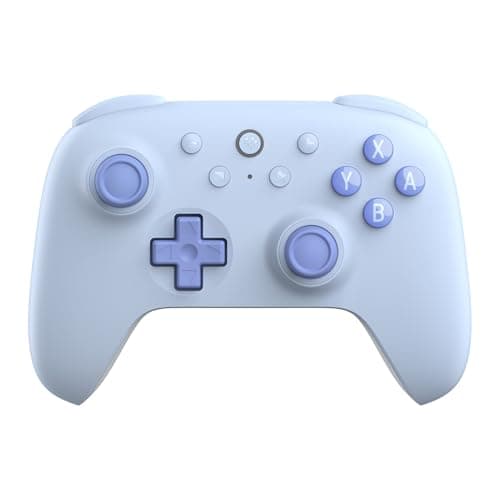
8BitDo Ultimate 2C Wireless Controller

Switch / PC / mobile

Hall-effect sticks (no stick drift, ever) and rock-solid wireless for around twenty-five dollars. It quietly outspecs pads costing three times as much.

Best value controller overall
9.2/10
Value
$29.99Amazon
02
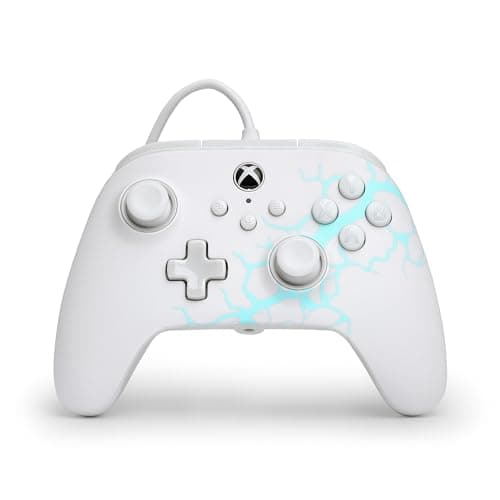
PowerA Advantage Wired Controller for Xbox

Xbox / PC

A full-size, officially licensed Xbox and PC pad with drift-proof Hall-effect sticks and two mappable back buttons for about thirty dollars — roughly half what the official controller costs.

Best cheap Xbox/PC pad
8.5/10
Value
$29.99Amazon
03
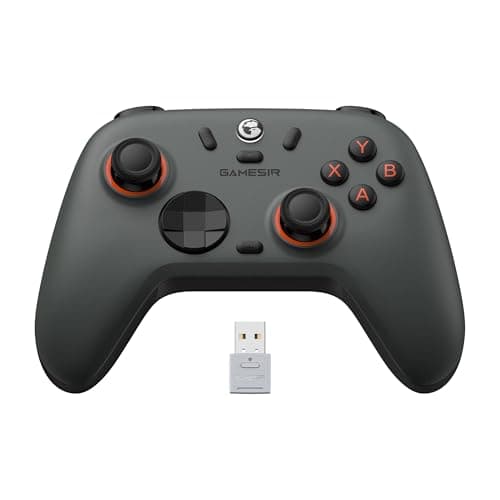
GameSir Nova Lite Wireless Controller

PC / Switch / mobile

A do-everything budget pad with Hall-effect sticks and multi-platform support for around thirty dollars. A lot of controller for very little money.

Best multi-platform budget pad
8.6/10
Value
$29.99Amazon

#ad · Live prices from the Amazon Product API, as of October 5, 2026. Where we have no verified live price, we show none — we would rather leave a gap than print a number that has rotted.

In detail

The picks, in full

01
8BitDo Ultimate 2C Wireless Controller

Best value controller overall

8BitDo Ultimate 2C Wireless Controller

Switch / PC / mobile · Physical

WirelessHall-effect sticksSwitch/PC~$25
9.2/10
Value

Hall-effect sticks (no stick drift, ever) and rock-solid wireless for around twenty-five dollars. It quietly outspecs pads costing three times as much.

Pros

  • Drift-proof Hall-effect sticks
  • Excellent build for the price
  • Great software/remapping

Cons

  • Not for PlayStation or Xbox consoles
  • No HD rumble

Don't buy this if…

…you need it for a PS5 or Xbox console — it's a Switch/PC/mobile pad.

$29.99View on Amazon

Price as of October 5, 2026. Prices change — Amazon's is the one that counts.

#ad · we may earn a commission from this link to 8BitDo Ultimate 2C Wireless Controller

02
PowerA Advantage Wired Controller for Xbox

Best cheap Xbox/PC pad

PowerA Advantage Wired Controller for Xbox

Xbox / PC · Physical

WiredXbox/PCHall-effect sticks~$30
8.5/10
Value

A full-size, officially licensed Xbox and PC pad with drift-proof Hall-effect sticks and two mappable back buttons for about thirty dollars — roughly half what the official controller costs.

Pros

  • Drift-proof Hall-effect thumbsticks
  • Two mappable back buttons and three-position trigger locks
  • Officially licensed, with a 10ft USB-C cable and 3.5mm headset jack

Cons

  • Wired only
  • Xbox consoles and Windows only — no Switch, PlayStation or mobile

Don't buy this if…

…you want wireless or a pad that roams between platforms — this one is cabled and Xbox/PC only.

$29.99View on Amazon

Price as of October 5, 2026. Prices change — Amazon's is the one that counts.

#ad · we may earn a commission from this link to PowerA Advantage Wired Controller for Xbox

03
GameSir Nova Lite Wireless Controller

Best multi-platform budget pad

GameSir Nova Lite Wireless Controller

PC / Switch / mobile · Physical

WirelessHall-effect sticksPC/Switch/mobile~$30
8.6/10
Value

A do-everything budget pad with Hall-effect sticks and multi-platform support for around thirty dollars. A lot of controller for very little money.

Pros

  • Drift-proof sticks
  • Works across PC, Switch and phones
  • Cheap

Cons

  • Software is fiddly
  • Not for PlayStation/Xbox consoles

Don't buy this if…

…you want a single-platform, plug-and-play pad — this trades polish for flexibility.

$29.99View on Amazon

Price as of October 5, 2026. Prices change — Amazon's is the one that counts.

#ad · we may earn a commission from this link to GameSir Nova Lite Wireless Controller

Is it actually drift? Three checks first

Plenty of "drift" turns out to be something cheaper to fix. Work through these before you buy anything.

1. Test it outside the game

Every console and Windows has a controller test or calibration screen that shows raw stick position. Rest your hands off the pad entirely and watch it. If the indicator sits off-centre or wanders with nothing touching it, that is drift. If it sits dead centre but your character still creeps in one game, the problem is that game's settings, not your hardware.

2. Rule out the obvious interference

A dirty stick gate, something lodged under the rim, a thumb grip that has slipped, or a low-battery wireless pad behaving oddly all produce drift-like symptoms. Clean around the stick base gently, remove any add-ons, and try a fresh charge or a cable. Recalibrating in the console's settings is free and sometimes buys you months.

3. Check the game's own deadzone setting

Many games expose a stick deadzone slider. Raising it slightly is the standard way to live with a mildly drifting pad, and it is also how to confirm the diagnosis: if a bigger deadzone makes the problem vanish, the stick is reading off-centre. Note what this costs you — a larger deadzone means less fine control near centre, which you will feel in aiming.

What you can do once drift has started

In order of how much we would recommend them. Recalibrate first, because it is free. Increase the in-game deadzone second, accepting the loss of precision. Third, if the pad is still in warranty, claim it — drift within a warranty period is exactly what a warranty is for, and manufacturers do replace pads for it. Opening the controller to clean or replace the stick module yourself is a real option and a real way to void your warranty and break something else; we would only reach for it on a pad that is already out of support and otherwise destined for a drawer.

What does not work: a firmware update will not restore a worn track, and no software setting removes the underlying error — it only hides a bigger slice of the stick's range.

How to avoid it on your next controller

Buy Hall-effect. It is stated plainly on the listings of the pads that have it, it is now available for well under thirty dollars, and it removes the failure mode rather than delaying it. Beyond that, the ordinary care advice applies and is worth about what it sounds like: store the pad somewhere it will not collect dust, do not eat over it, and keep thumb grips clean if you use them.

The thing not to do is treat drift as a reason to spend more money in general. Price and drift-resistance are not the same axis — several expensive pads still use conventional sticks, and several cheap ones do not. If you want the ranked options, they are on best budget controllers, and the two cheapest drift-proof wireless pads are compared directly in 8BitDo Ultimate 2C vs GameSir Nova Lite.

How we picked

We don't test games in a lab

Most "best cheap games" lists just re-rank the same store page. We don't, and we won't pretend to run a test lab we don't have. What we do: compile the real current and historical-low prices, the actual playtime and replay data, and the sale cycle — then do the value math and tell you what to skip. The full method is on how we pick. Everything here is checkable.

Questions

Frequently asked

01What causes stick drift on a controller?
Physical wear inside a conventional analogue stick. The stick reads position by dragging a contact along a resistive track, the track wears where the contact rests most — the centre — and debris gets in, so the pad reports movement when the stick is at rest. It is a mechanical problem, which is why no software update fixes it.
02Can stick drift be fixed?
It can be managed rather than cured. Recalibrating in your console's settings is free and sometimes helps; increasing a game's deadzone hides the error at the cost of fine control near centre. If the pad is in warranty, claim it — drift is a standard warranty case. Opening the controller to replace the stick module works but voids warranty and risks further damage.
03Do Hall-effect sticks really prevent drift?
They prevent the specific wear-based failure that causes most drift, because nothing physically slides along anything — the stick's position is read magnetically. The rest of the controller still wears normally and a stick can still be damaged, but the usual way pads die does not start.
04How long do controllers last before stick drift?
There is no trustworthy published figure, and we are not going to invent one — it depends on hours, grip strength, dust and luck. What is verifiable is that conventional sticks wear and Hall-effect sticks have no wearing contact, which is the difference worth buying on.
05Which cheap controllers have Hall-effect sticks?
All three above: the 8BitDo Ultimate 2C, the PowerA Advantage for Xbox and Windows, and the GameSir Nova Lite. The full ranked list, including the pads that do not have them, is on best budget controllers.

Keep reading

Sources

Where this comes from